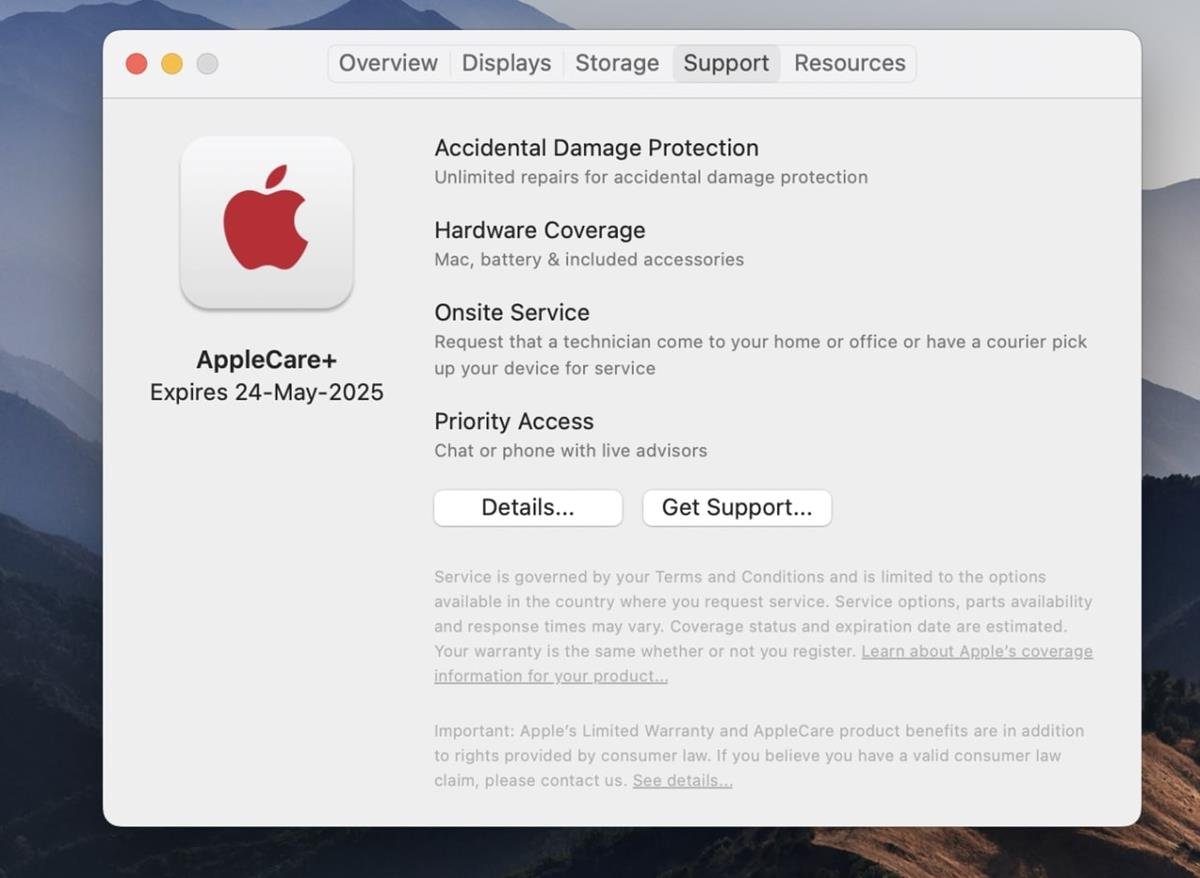
When you invest in an Apple device, you're not just buying a gadget; you're buying into an ecosystem of design, performance, and, crucially, support. But navigating the nuances of that support can feel a bit like reading legal fine print. So, what is AppleCare+ and what does it cover? It's a question many ask, often after an accidental drop or a mysterious malfunction, hoping for a clear answer before an unexpected repair bill arrives. Simply put, AppleCare+ is Apple's premium, paid extended warranty that dramatically broadens your safety net beyond the standard coverage, offering peace of mind for the bumps, spills, and technical glitches life throws at your beloved devices.
Let's cut through the jargon and get straight to what you need to know about keeping your Apple gear protected.
At a Glance: AppleCare+ Essentials
- Extended Protection: Extends your hardware warranty and technical support beyond Apple's standard limited warranty.
- Accidental Damage Covered: Protects against drops, spills, and other accidental damage (with a service fee per incident).
- 24/7 Priority Support: Get around-the-clock access to Apple experts via chat or phone.
- Express Replacement Service: For iPhones, get a replacement device shipped to you quickly.
- Theft & Loss Option (iPhone Only): An additional add-on for iPhones that covers loss or theft (also with a service fee).
- Doesn't Cover Everything: Excludes cosmetic damage not affecting functionality, misuse, unauthorized repairs, or normal battery aging above 80% health.
- Cost Varies: Pricing depends on your specific device and chosen plan duration.
- Service Fees Apply: While repairs for defects are often free under standard AppleCare, accidental damage claims under AppleCare+ incur specific service fees.
Demystifying Apple's Core Warranties: AppleCare vs. AppleCare+
Before diving deep into AppleCare+, it's important to understand its foundation: the standard AppleCare warranty. Think of it as the basic, no-frills coverage you get automatically.
Every new Apple product comes with a limited warranty (what's often casually referred to as "AppleCare" without the "+"). This free coverage typically includes one year of hardware service for manufacturing defects and 90 days of complimentary technical support. So, if your iPhone's charging port inexplicably stops working, or your MacBook screen starts flickering without impact, you're likely covered—assuming it's a defect and not self-inflicted damage. It's designed to protect against things Apple got wrong in manufacturing, not things you accidentally broke. This standard warranty specifically excludes damage from accidents, liquid exposure, misuse, external causes (like fire or earthquakes), or any unauthorized third-party repairs.
Now, AppleCare+ enters the picture as the robust upgrade. It's a paid, extended protection plan that significantly expands upon that basic warranty. It's what you buy if you want to extend your device's lifespan and shield it from the costly realities of accidental damage. It's for those moments when your iPhone takes an unexpected dive into a puddle or your iPad slips from your grasp onto a hard floor.
What AppleCare+ Truly Covers: Your Device's Safety Net
AppleCare+ isn't just an extension; it's an enhancement. It’s designed to provide comprehensive protection, both for hardware and the support you need.
Extended Hardware Service
This is the bedrock of AppleCare+. It prolongs the period your device is covered for hardware defects and malfunctions beyond the standard one year. For many devices, this extends your coverage to two or three years from the purchase date, depending on the plan you select. This means if a manufacturing defect crops up in year two, you're still protected, saving you from potentially significant unexpected repair costs for Apple devices.
24/7 Priority Access to Apple Technical Support
Running into a software glitch or simply have a "how-to" question? AppleCare+ grants you priority access to Apple's experts around the clock. Whether it's troubleshooting an app, connecting to Wi-Fi, or understanding a new feature, you can reach out via phone or chat anytime, without waiting in a general queue. This is invaluable when you're facing a deadline or just need a quick answer without hunting through online forums.
Accidental Damage Protection: The Big Draw
This is often the primary reason people opt for AppleCare+. Life happens, and screens crack, devices get wet, and gravity sometimes wins. AppleCare+ covers an unlimited number of incidents of accidental damage (for most products, though specifics can vary, so always check the terms for your device). This includes:
- Cracked screens: A common and costly mishap.
- Liquid damage: Spilled coffee on your MacBook, dropped your iPhone in the sink?
- Accidental drops: That stomach-lurching moment when your device hits the pavement.
For each accidental damage claim, you'll pay a specific service fee, which is significantly lower than the out-of-pocket cost for the same repair. For instance, an iPhone screen repair options might cost hundreds without AppleCare+, but just a fraction of that with coverage.
iPhone Express Replacement Service
Exclusively for iPhones, this service is a lifesaver. If you need a repair or replacement, Apple will ship you a replacement iPhone, often overnight, before you send your damaged one in. This minimizes downtime, ensuring you're not without your essential communication tool for long. Once you receive the replacement, you simply send your original device back to Apple in the provided packaging.
AppleCare+ with Theft and Loss (iPhone Only)
For an additional premium, iPhone users can opt for AppleCare+ with Theft and Loss. This specialized plan extends coverage to include incidents where your iPhone is lost or stolen. It's important to note that without this specific plan, standard AppleCare+ does not cover loss or theft. This plan typically allows for up to two incidents of theft or loss coverage every 12 months, each subject to a service fee. To process a theft or loss claim, you'll need to have Find My enabled on your device at the time it was lost or stolen.
What AppleCare+ Doesn't Cover: Knowing the Limitations
While comprehensive, AppleCare+ isn't a magic shield for every scenario. Understanding its boundaries helps manage expectations and avoid surprises.
- Loss or Theft (unless specific plan purchased): As mentioned, if you don't specifically buy AppleCare+ with Theft and Loss for your iPhone, a lost or stolen device is not covered. For other devices like iPads or MacBooks, there is no Theft and Loss option, so these incidents are never covered.
- Cosmetic Damage Only: Scratches, dents, or discolorations that do not affect the functionality of your device are generally not covered. If your iPhone gets a scuff but works perfectly, AppleCare+ won't replace it.
- Damage from Misuse or Abuse: Intentional damage, gross negligence, or using your device in ways it wasn't intended for (e.g., throwing it, intentionally submerging it beyond its water resistance rating) typically voids coverage.
- Unauthorized Repairs: If you or a third-party service provider (not Apple or an Apple Authorized Service Provider) attempts to repair or modify your device, any subsequent issues may not be covered by AppleCare+.
- Normal Battery Aging: While AppleCare+ covers battery defects, it generally doesn't cover the natural degradation of battery capacity over time. However, if your device's battery capacity drops below 80% of its original capacity during your coverage period, AppleCare+ will typically replace it free of charge.
Understanding the Investment: Costs and Service Fees
AppleCare+ is a paid service, and its cost varies significantly based on the device you're protecting. This pricing structure reflects the complexity and potential repair costs of different products.
AppleCare+ Plan Costs
You can purchase AppleCare+ either upfront for a fixed multi-year period (e.g., two or three years) or as a recurring monthly/annual subscription.
- AirPods: Expect a lower annual cost, sometimes around $29 for two years.
- iPads: Costs can range from around $69 for two years for an iPad mini to $149 for an iPad Pro.
- Apple Watch: Varies by model, from $49 for Apple Watch SE to $149 for Apple Watch Ultra for two years.
- iPhones: Depending on the model (SE, standard, Pro Max), annual plans can range from $79 to $199, or two-year plans from $149 to $269. The Theft and Loss option adds an extra premium on top.
- MacBooks: These represent the highest tier of AppleCare+ pricing, given their high repair costs. A 13-inch MacBook Air might be around $199 for three years, while a 16-inch MacBook Pro could be $399 or more for three years.
These are illustrative examples, and exact pricing can change. Always check Apple's official website or an Apple Store for the most current costs for your specific device.
Service Fees (Deductibles) for Accidental Damage
While standard AppleCare repairs for manufacturing defects have no deductible, accidental damage claims under AppleCare+ do incur a service fee. These fees are significantly less than what you'd pay for an out-of-warranty repair.
Here are some common service fees for accidental damage incidents:
- iPhone Screen Repair: Typically $29.
- Other iPhone Accidental Damage (e.g., back glass, liquid damage, full device replacement): Typically $99.
- iPhone Theft or Loss Replacement (with Theft and Loss plan): Typically $149.
- iPad Accidental Damage: Typically $49.
- Mac Accidental Damage (screen, enclosure, or other): Often $99 for screen-only damage, or $299 for other types of damage.
- Apple Watch Accidental Damage: Typically $69 (or less for older/SE models).
- AirPods Accidental Damage: Often $29 per incident.
These fees apply per incident of accidental damage. This structure allows you to claim multiple times throughout your coverage period, though there's usually a limit on the number of theft/loss claims (typically two within a 12-month period for iPhones). It's a key part of the full range of AppleCare+ benefits that helps manage unforeseen expenses.
How to Get AppleCare+ and What to Do When You Need Service
Purchasing and utilizing AppleCare+ is straightforward, but knowing the process helps.
Purchasing AppleCare+
You can buy AppleCare+ at the time you purchase your new device, or within 60 days of your device purchase. Apple offers several ways to purchase:
- Online: During checkout on Apple's website.
- In-Store: At an Apple Store (where your device can be inspected).
- Over the Phone: By calling Apple directly.
- On Device: For iPhones and iPads, you can often purchase AppleCare+ directly through the Settings app (Settings > General > About > AppleCare+ Coverage Available).
If purchasing after the initial device buy, Apple might require you to run a remote diagnostic or have your device physically inspected to ensure it's in good condition.
Checking Your Coverage Status
Unsure if you're covered or when your plan expires? It's easy to verify.
- Apple's Website: Visit Apple's "Check Coverage" page and enter your device's serial number.
- Settings App (iOS/iPadOS): Go to Settings > General > About > AppleCare+ (or Coverage).
- My Support App: Download Apple's My Support app on your device for an overview of all your Apple products and their coverage.
Knowing how to check your AppleCare status is a crucial first step when you suspect you need service.
Getting Service with AppleCare+
If your device needs attention, contact Apple directly. They will guide you through the process and help determine the best course of action:
- Online Support: Start at Apple's support website to initiate a service request.
- Phone Support: Call Apple's technical support line.
- Apple Store Appointment: Schedule a Genius Bar appointment at your nearest Apple Store for in-person assessment and repair.
- Apple Authorized Service Provider: Visit an independent repair shop authorized by Apple.
Depending on the issue and your location, Apple might offer different service options:
- Carry-in Service: Take your device to an Apple Store or authorized provider.
- Mail-in Service: Ship your device to an Apple Repair Center (packaging often provided).
- Express Replacement Service: For eligible iPhones, receive a replacement device before sending yours back.
Is AppleCare+ Worth It for You? Making an Informed Decision
Deciding whether to purchase AppleCare+ boils down to a personal risk assessment based on your habits, device, and financial comfort. There's no universal "yes" or "no" answer, but here are the factors to weigh.
Who Benefits Most from AppleCare+?
- Accident-Prone Individuals: If you're known for dropping phones, spilling drinks, or have kids who use your devices, the accidental damage protection is a significant benefit.
- High-Value Device Owners: For expensive devices like MacBook Pros, iPad Pros, or the latest iPhones, out-of-warranty repairs can be astronomically high. AppleCare+ offers a substantial discount on these potential costs.
- Those Who Value Peace of Mind: Knowing you're covered reduces anxiety about potential damage and the associated financial hit. It extends the useful life of your device without worrying about a single mishap forcing an expensive replacement.
- People Who Keep Devices Long-Term: If you plan to use your device for two, three, or even four years, the extended warranty and support can be invaluable over its lifespan.
- iPhone Users Worried About Theft/Loss: If you live in an area with high theft rates or are particularly prone to misplacing your phone, the AppleCare+ with Theft and Loss option could be a wise investment.
When Might You Skip AppleCare+?
- Extremely Careful Users: If you're meticulous with your devices, always use robust cases and screen protectors, and have never broken a gadget, you might find the cost unnecessary.
- Budget-Conscious Individuals: If the upfront or recurring cost of AppleCare+ is a strain, and you're confident in your ability to self-insure or manage potential repair costs, you might opt out.
- Those Who Upgrade Frequently: If you replace your iPhone every year, or your MacBook every two years, you might not fully utilize the extended coverage period.
- Adequate Emergency Fund: If you have an emergency fund readily available to cover the full, out-of-warranty cost of a major repair or replacement, you might choose to self-insure.
Alternatives to Consider
AppleCare+ isn't your only option for protecting your devices:
- Carrier-Offered Phone Insurance: Mobile carriers like Verizon, AT&T, or T-Mobile often offer their own insurance plans. These can sometimes bundle in extra features like spam blocking, cloud storage, or even coverage for non-Apple devices. Compare their accidental damage fees and coverage for loss/theft carefully with AppleCare+'s offerings.
- Third-Party Device Insurance: Independent insurance companies also offer plans for electronics. These can sometimes be more flexible or cover multiple devices, but always scrutinize deductibles and claim processes.
- Physical Protection: Sometimes the best defense is a good offense. High-quality screen protectors, robust cases (like OtterBox or Spigen), and sleeves for laptops can significantly reduce the likelihood of accidental damage, making expensive repairs less likely.
- Homeowner's/Renter's Insurance: In some cases, your existing home insurance policy might cover high-value electronics against theft or damage, though deductibles can be high and claims could impact your premiums.
Ultimately, the decision to purchase AppleCare+ balances cost against potential risk. For many, the peace of mind and significantly reduced out-of-pocket expenses for accidental damage make it a worthwhile investment, especially for their most used and most expensive Apple devices. To deep dive into this decision, you can Find out if AppleCare is worth it.
Final Thoughts: Protecting Your Investment
AppleCare+ is more than just an extended warranty; it's a comprehensive service plan designed to protect your investment and keep your Apple devices running smoothly for longer. It mitigates the financial sting of accidental damage, offers expert support at your fingertips, and ensures you're back up and running quickly if something goes wrong.
Whether you're a careful user or someone who occasionally challenges gravity with your gadgets, understanding what AppleCare+ offers—and what it doesn't—empowers you to make an informed choice. Consider your usage habits, the value of your device, and your comfort level with potential out-of-pocket repair costs. By doing so, you can ensure your beloved Apple products are protected, giving you the confidence to use them to their fullest, knowing help is always at hand.